EDIT: This giveaway is over and the winner is determined.
March 10, 2014
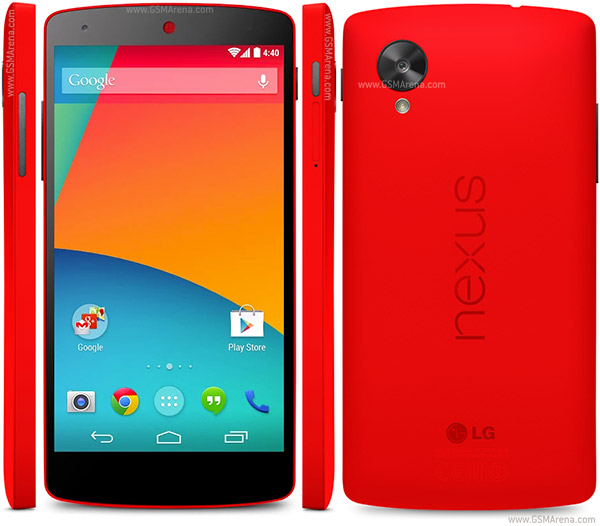
[GIVEAWAY OVER] Win a Google/LG Nexus 5! (not by me)
EDIT: This giveaway is over and the winner is determined.
[GUIDE] Improve captured image & video quality
Hi,
This is a guide that will improve your captured image & video quality captured with your phone or tablet.
Notice:
- This guide will work with all Android devices and ROMs.
Steps:
1. Look for media_profiles.xml at /system/etc and open it.
2. Find this line (there will be two lines, one for camera & another for video):
<ImageEncoding quality="90"/>
<ImageEncoding quality="80"/>
<ImageEncoding quality="70"/>
<ImageDecoding memCap="1000000"/>
3. Change the ImageEncoding quality value to this:
<ImageEncoding quality="120"/>
<ImageEncoding quality="110"/>
<ImageEncoding quality="100"/>
<ImageDecoding memCap="1000000"/>
4. Save (make sure that permission is still rw-r--r--) and reboot.
5. Profit?
This is a guide that will improve your captured image & video quality captured with your phone or tablet.
Notice:
- This guide will work with all Android devices and ROMs.
Steps:
1. Look for media_profiles.xml at /system/etc and open it.
2. Find this line (there will be two lines, one for camera & another for video):
<ImageEncoding quality="90"/>
<ImageEncoding quality="80"/>
<ImageEncoding quality="70"/>
<ImageDecoding memCap="1000000"/>
3. Change the ImageEncoding quality value to this:
<ImageEncoding quality="120"/>
<ImageEncoding quality="110"/>
<ImageEncoding quality="100"/>
<ImageDecoding memCap="1000000"/>
4. Save (make sure that permission is still rw-r--r--) and reboot.
5. Profit?
[ROM][CM7.2][PORT] MIUIv3 2.4.20 GB for Samsung Galaxy Y
Hi,
This is a ROM that made by bangprovn from xda-developers. It is based on more stable bieltv.3's CyanogenMod 7.2 build.
Original thread:
http://forum.xda-developers.com/showthread.php?t=2676532
Notice:
- This ROM is only for Samsung Galaxy Y GT-S5360/B/L variant only.
- Try this at your own risk.
- DO NOT USE MDPI (or higher) themes and lockscreen. It will screw up your phone.
Features:
- Phone & SMS: Better Call & SMS experience.
- Over 200 functions: Make life a bit easier
- Reliable protection: Equipped with Kingsoft, Wall-E, LBE and other security software to protect device contents.
- Customization on another level: Personalized themes, numerous lockscreen and a variety of MiSpace to choose from.
- Larger font sizes: Making your phone adjust to your eye vision, not vice versa.
Bugs:
- Icon in launcher is so small, try to apply default theme.
- Backup function doesn't work properly, SOLUTION: don't backup Gallery, Music, Voice Recording, DND. Some system applications give error when backup them.
How to install? (Follow properly)
1. (HIGHLY RECOMMENDED) Be on a stock ROM, installation will be cleaner
2. Download THIS EXT4 tool, the Kernel and the Rom on your device.
3. Flash on Samsung recovery (or your recovery if you are not on stock), this temp. CWM (by bieltv.3)
4. When you are on the Temp. CWM, flash the EXT4 Formatter tool, so whole system will be converted to EXT4. (Stock filesystem is RFS)
5. After the installation, flash the kernel attached below
6. When the Kernel is installed, go to the CWM, to advanced --> reboot recovery (this will reboot the device, and turn it on on the new CWM of kernel)
7. Wipe data, cache and dalvik cache.
8. (IMPORTANT) Go to mounts and storage, and make sure system is mounted (will show unmounted) mount it 2 times!
9. Go to install zip from SD Card, choose zip from SD card and install this ROM. (MAKE SURE installation last more than 5 seconds, if is less than 5 seconds, your system is unmounted! repeat step 8).
10. Mount the System again and install GApps (Optional).
11. After installation, go back and reboot system, if you made it good, ROM boots, so no problem on it.
Download:
ROM:
http://d-h.st/nFp
md5 sum: c63b993ba7d544da4be13335a385a101
KERNEL:
http://www.mediafire.com/download/lzw3ddt9dtd9tw3/kernel_CM7_v4.0_totoro.zip
GAPPS (Optional):
http://goo.im/gapps/gapps-gb-20110828-signed.zip
Screenshots:
This is a ROM that made by bangprovn from xda-developers. It is based on more stable bieltv.3's CyanogenMod 7.2 build.
Original thread:
http://forum.xda-developers.com/showthread.php?t=2676532
Notice:
- This ROM is only for Samsung Galaxy Y GT-S5360/B/L variant only.
- Try this at your own risk.
- DO NOT USE MDPI (or higher) themes and lockscreen. It will screw up your phone.
Features:
- Phone & SMS: Better Call & SMS experience.
- Over 200 functions: Make life a bit easier
- Reliable protection: Equipped with Kingsoft, Wall-E, LBE and other security software to protect device contents.
- Customization on another level: Personalized themes, numerous lockscreen and a variety of MiSpace to choose from.
- Larger font sizes: Making your phone adjust to your eye vision, not vice versa.
Bugs:
- Icon in launcher is so small, try to apply default theme.
- Backup function doesn't work properly, SOLUTION: don't backup Gallery, Music, Voice Recording, DND. Some system applications give error when backup them.
How to install? (Follow properly)
1. (HIGHLY RECOMMENDED) Be on a stock ROM, installation will be cleaner
2. Download THIS EXT4 tool, the Kernel and the Rom on your device.
3. Flash on Samsung recovery (or your recovery if you are not on stock), this temp. CWM (by bieltv.3)
4. When you are on the Temp. CWM, flash the EXT4 Formatter tool, so whole system will be converted to EXT4. (Stock filesystem is RFS)
5. After the installation, flash the kernel attached below
6. When the Kernel is installed, go to the CWM, to advanced --> reboot recovery (this will reboot the device, and turn it on on the new CWM of kernel)
7. Wipe data, cache and dalvik cache.
8. (IMPORTANT) Go to mounts and storage, and make sure system is mounted (will show unmounted) mount it 2 times!
9. Go to install zip from SD Card, choose zip from SD card and install this ROM. (MAKE SURE installation last more than 5 seconds, if is less than 5 seconds, your system is unmounted! repeat step 8).
10. Mount the System again and install GApps (Optional).
11. After installation, go back and reboot system, if you made it good, ROM boots, so no problem on it.
Download:
ROM:
http://d-h.st/nFp
md5 sum: c63b993ba7d544da4be13335a385a101
KERNEL:
http://www.mediafire.com/download/lzw3ddt9dtd9tw3/kernel_CM7_v4.0_totoro.zip
GAPPS (Optional):
http://goo.im/gapps/gapps-gb-20110828-signed.zip
Screenshots:
Labels:
android,
cwm,
Galaxy Y GT-S5360,
gingerbread,
recovery,
root
March 9, 2014
[APP][SHARE][2.3+] DuoFM Holo File Browser
Hi,
This is app that made by uncopt from xda-developers. Its UI is based on Windows Explorer and Mac finder.
Original thread:
http://forum.xda-developers.com/showthread.php?t=2650583
Notice:
- This app is compatible with Android devices running Gingerbread (2.3.x) or above.
Features:
- Root explorer
- Windows Explorer and Mac finder alike UI with Holo.
- Enhanced security
- Manage Dropbox, Google Drive, SkyDrive, FTP & LAN storages.
- USB OTG storage reading supported.
How to install?
1. Just download from Google Play link below.
Download:
http://goo.gl/5RKDm (free version)
http://goo.gl/m9ksq (full version)
http://goo.gl/hD30T (LAN plugin)
http://goo.gl/f9668U (Dropbox plugin)
http://goo.gl/B1ssR9 (Google Drive plugin)
http://goo.gl/ZspZ7L (FTP plugin)
http://goo.gl/BWdXsa (SkyDrive plugin)
Screenshots:
This is app that made by uncopt from xda-developers. Its UI is based on Windows Explorer and Mac finder.
Original thread:
http://forum.xda-developers.com/showthread.php?t=2650583
Notice:
- This app is compatible with Android devices running Gingerbread (2.3.x) or above.
Features:
- Root explorer
- Windows Explorer and Mac finder alike UI with Holo.
- Enhanced security
- Manage Dropbox, Google Drive, SkyDrive, FTP & LAN storages.
- USB OTG storage reading supported.
How to install?
1. Just download from Google Play link below.
Download:
http://goo.gl/5RKDm (free version)
http://goo.gl/m9ksq (full version)
http://goo.gl/hD30T (LAN plugin)
http://goo.gl/f9668U (Dropbox plugin)
http://goo.gl/B1ssR9 (Google Drive plugin)
http://goo.gl/ZspZ7L (FTP plugin)
http://goo.gl/BWdXsa (SkyDrive plugin)
Screenshots:
[APP] Now Browser
Hi,
This is a browser that made by Jeeko from xda-developers. It is proved to be fastest among others.
Original thread:
http://forum.xda-developers.com/showthread.php?t=2672639
Notice:
- This app is for all Android devices.
Features:
★ Google Now themed
★ Powerful tabbed browsing
★ Navigation gestures: (thanks to Lighting Browser for concepts)
- Swipe from left to right to go to the next page
- Swipe from right to left to go to the previous page
- Double-tap on a zoomed page to fit the screen perfectly
- Long press a tab to close it
- Long press the back button to exit from the browser
★ Support for Flash Player, to play web games on your smartphone!
★ X Connectionsave Mode™*: don't charges images to save your
3G traffic limit (Pro only)
★ Incognito Mode
★ Differents user agent (Desktop, Phone)
★ Java Script Acceleration*: Use Java Script Superfast Mode to speed
the performance of Java Scripts three times higher (Pro only)
★ Full screen mode
★ Working History
★ Importable bookmarks
Download:
https://play.google.com/store/apps/details?id=com.browser.nowbasic (free version)
https://play.google.com/store/apps/details?id=com.browser.nowpro (pro version)
Screenshots:
This is a browser that made by Jeeko from xda-developers. It is proved to be fastest among others.
Original thread:
http://forum.xda-developers.com/showthread.php?t=2672639
Notice:
- This app is for all Android devices.
Features:
★ Google Now themed
★ Powerful tabbed browsing
★ Navigation gestures: (thanks to Lighting Browser for concepts)
- Swipe from left to right to go to the next page
- Swipe from right to left to go to the previous page
- Double-tap on a zoomed page to fit the screen perfectly
- Long press a tab to close it
- Long press the back button to exit from the browser
★ Support for Flash Player, to play web games on your smartphone!
★ X Connectionsave Mode™*: don't charges images to save your
3G traffic limit (Pro only)
★ Incognito Mode
★ Differents user agent (Desktop, Phone)
★ Java Script Acceleration*: Use Java Script Superfast Mode to speed
the performance of Java Scripts three times higher (Pro only)
★ Full screen mode
★ Working History
★ Importable bookmarks
Download:
https://play.google.com/store/apps/details?id=com.browser.nowbasic (free version)
https://play.google.com/store/apps/details?id=com.browser.nowpro (pro version)
Screenshots:
March 8, 2014
[ROM][STOCK] PureKAT Extreme for Samsung Galaxy Pocket v1.0
Hi,
This is a ROM that made by san122 from xda-developers. It is based on stock 2.3.6 ROM.
Original thread:
http://forum.xda-developers.com/showthread.php?t=2674070
Notice:
- This ROM is only for Samsung Galaxy Pocket GT-S5300/B/L variant only.
- Try this at your own risk.
Features:
- Based on GINGERBREAD firmware.
- Fully Kikat themed.
- Holo white UI on all apps.
- 4 tabs on statusbar.
- Clean and Fresh UI.
- Themed each and every app with perfection.
- No init.d tweaks included.
- 6 Lidroid lockscreens.
- MegaBASS audio booster included for perfect sound.
- And much more....
How to install (ROM)?
1. Boot into CWM recovery by pressing Volume Up+Home+Power button at the same time.
2. Go to the mounts and storage menu.
3. Wipe data / factory reset.
4. Wipe cache partition
5. Flash rom zip. ( Purekat 1.0.zip)
6. Reboot system now.
This is a ROM that made by san122 from xda-developers. It is based on stock 2.3.6 ROM.
Original thread:
http://forum.xda-developers.com/showthread.php?t=2674070
Notice:
- This ROM is only for Samsung Galaxy Pocket GT-S5300/B/L variant only.
- Try this at your own risk.
Features:
- Based on GINGERBREAD firmware.
- Fully Kikat themed.
- Holo white UI on all apps.
- 4 tabs on statusbar.
- Clean and Fresh UI.
- Themed each and every app with perfection.
- No init.d tweaks included.
- 6 Lidroid lockscreens.
- MegaBASS audio booster included for perfect sound.
- And much more....
How to install (ROM)?
1. Boot into CWM recovery by pressing Volume Up+Home+Power button at the same time.
2. Go to the mounts and storage menu.
3. Wipe data / factory reset.
4. Wipe cache partition
5. Flash rom zip. ( Purekat 1.0.zip)
6. Reboot system now.
Download:
Credits:
MuSaddiq
Fang Leone
DC07
marcussmith2626
aniket.lamba
lidroid
evanlocked
lidroid
PineappleOwl
Cod
geva28
b16h22
-CALIBAN666-
luqman98
Rhievaldo
ryanfebriyadi
m4rinko2
Mranggapo
Gendows
Nero Young
BarJei
ImBJ
Screenshots:
[ROM] bieltv.3's CyanogenMod 7.2 (2.3.7) for Samsung Galaxy Y (Update 9 March 2014)
Hi,
This is a ROM that made by bieltv.3 from xda-developers. It is better than percy_g2's CyanogenMod 7.2.
Original thread:
http://forum.xda-developers.com/showthread.php?t=2673610
Notice:
- This ROM is only for Samsung Galaxy Y GT-S5360/B/L variant only.
- Try this at your own risk.
Features:
- Suitable for daily use (daily driver).
Bugs:
- Kernel:
- Cannot read contacts from SIM card. Backup your contacts first!
- ROM:
- USB tethering not working.
- Some CM Settings won't work.
How to install? (Follow properly)
1. (HIGHLY RECOMMENDED) Be on a stock ROM, installation will be cleaner
2. Download THIS EXT4 tool, the kernel and this ROM below.
3. Flash on Samsung recovery (or your recovery if you are not on stock), this temp. CWM (by bieltv.3)
4. When you are on the Temp. CWM, flash the EXT4 Formatter tool, so whole system will be converted to EXT4. (Stock filesystem is RFS)
5. After the installation, flash the kernel attached below
6. When the Kernel is installed, go to the CWM, to advanced --> reboot recovery (this will reboot the device, and turn it on on the new CWM of kernel)
7. Wipe data, cache and dalvik cache.
8. (IMPORTANT) Go to mounts and storage, and make sure system is mounted (will show unmounted) mount it 2 times!
9. Go to install zip from SD Card, choose zip from SD card and install this ROM. (MAKE SURE installation last more than 5 seconds, if is less than 5 secodns, your system is unmounted! repeate step 8).
10. Mount the System again and install GApps.
11. After installation, go back and reboot system, if you made it good, ROM boots, so no problem on it.
Download:
http://www.mediafire.com/download/5v2io5ukx5qvk9d/CM7_totoro_RC_04.zip (New build, 9 March 2014)
http://www.mediafire.com/download/lzw3ddt9dtd9tw3/kernel_CM7_v4.0_totoro.zip (Kernel)
http://goo.im/gapps/gapps-gb-20110828-signed.zip (Google Apps)
This is a ROM that made by bieltv.3 from xda-developers. It is better than percy_g2's CyanogenMod 7.2.
Original thread:
http://forum.xda-developers.com/showthread.php?t=2673610
Notice:
- This ROM is only for Samsung Galaxy Y GT-S5360/B/L variant only.
- Try this at your own risk.
Features:
- Suitable for daily use (daily driver).
Bugs:
- Kernel:
- Cannot read contacts from SIM card. Backup your contacts first!
- ROM:
- USB tethering not working.
- Some CM Settings won't work.
How to install? (Follow properly)
1. (HIGHLY RECOMMENDED) Be on a stock ROM, installation will be cleaner
2. Download THIS EXT4 tool, the kernel and this ROM below.
3. Flash on Samsung recovery (or your recovery if you are not on stock), this temp. CWM (by bieltv.3)
4. When you are on the Temp. CWM, flash the EXT4 Formatter tool, so whole system will be converted to EXT4. (Stock filesystem is RFS)
5. After the installation, flash the kernel attached below
6. When the Kernel is installed, go to the CWM, to advanced --> reboot recovery (this will reboot the device, and turn it on on the new CWM of kernel)
7. Wipe data, cache and dalvik cache.
8. (IMPORTANT) Go to mounts and storage, and make sure system is mounted (will show unmounted) mount it 2 times!
9. Go to install zip from SD Card, choose zip from SD card and install this ROM. (MAKE SURE installation last more than 5 seconds, if is less than 5 secodns, your system is unmounted! repeate step 8).
10. Mount the System again and install GApps.
11. After installation, go back and reboot system, if you made it good, ROM boots, so no problem on it.
Download:
http://www.mediafire.com/download/5v2io5ukx5qvk9d/CM7_totoro_RC_04.zip (New build, 9 March 2014)
http://www.mediafire.com/download/lzw3ddt9dtd9tw3/kernel_CM7_v4.0_totoro.zip (Kernel)
http://goo.im/gapps/gapps-gb-20110828-signed.zip (Google Apps)
Labels:
CM,
cwm,
CyanogenMod,
Galaxy Y GT-S5360,
recovery,
ROM,
root,
Tweaks
Subscribe to:
Comments (Atom)


