Hi,
This is a ROM that made by phantomhell@xda-dev.
Original thread:
http://forum.xda-developers.com/showthread.php?p=52365283
Notice:
- This ROM is only for Samsung Galaxy Pocket GT-S5300/B/L variant only.
- Try this at your own risk.
Features:
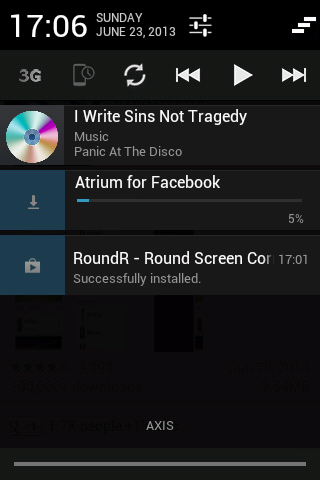
- 2 Tabs Notifications
- Fully Working WiFi and USB tether
- Flashlight Included
- Gapps Included
- More...
Bugs:
- Apps on memory card disappears even after using phone as USB storage (Hot reboot will fix it)
- Reboot menu (use Download option)
- External SD won't show on Storage Properties (Settings menu) & in Task Manager, but still accessible
How to install?
1. Boot to CWM recovery mode by pressing volume up key + home button + power key until CWM recovery shows.
2. Select mounts and storage.
3. Mount /system, /data, /cache.
4. Go back by pressing the power button or the back key.
5. Select advanced and debugging.
6. Select wipe dalvik cache and wipe batterystats.bin (optional).
7. Go back by pressing the power button or the back key.
8. Select wipe data and wipe cache partition.
9. Select install zip from SD card.
10. Select choose zip from SD card.
11. Select the downloaded file below.
12. Reboot your phone.
Download:
http://d-h.st/5rS
Credits:
- CarlDeanCatabay
- Audrie Gatcho
- Hyperion ROM dev
- Bilal Tawaqal
Screenshots:
Showing posts with label SGP. Show all posts
May 26, 2014
[KERNEL][CM] GetuX Kernel v1.5 for Galaxy Pocket
Hi,
This is a kernel that made by cleverior.ipul@xda-dev.
Original thread:
http://forum.xda-developers.com/showthread.php?t=2711277
Notice:
- This kernel is only for Samsung Galaxy Pocket GT-S5300/B/L.
- Try this at your own risk.
Features:
- 32 governors
- 7 I/O scheduler
- init.d support
- iptables/netfilter support (firewall)
- insecured
- Underclock to 208mhz
- OC to 1 ghz (unstable)
- ZRAM support
- Swap support
- Frandom support
How to install?
1. Boot to CWM recovery mode by pressing volume up key + home button + power key until CWM recovery shows.
2. Select mounts and storage.
3. Mount /system, /data & /cache.
4. Go back by pressing the power button or the back key.
5. Select advanced and debugging.
6. Select wipe dalvik cache and wipe batterystats.bin (optional).
7. Go back by pressing the power button or the back key.
8. Select wipe cache.
9. Select install zip from SD card.
10. Select choose zip from SD card.
11. Select the downloaded file below (matching your current ROM).
12. Follow the instructions provided in AROMA.
13. After that, reboot your phone.
Download:
For stock (based) ROMs:
http://www.mediafire.com/download/ra8sdrp88u9nhfh/%5BNEW%5DGetux_Kernel_v1.5.zip
For CyanogenMod (based) ROMs:
http://www.mediafire.com/download/884xy250yp5y1sp/%5BNEW%5DGetux_Kernel_v1.5_CM.zip
This is a kernel that made by cleverior.ipul@xda-dev.
Original thread:
http://forum.xda-developers.com/showthread.php?t=2711277
Notice:
- This kernel is only for Samsung Galaxy Pocket GT-S5300/B/L.
- Try this at your own risk.
Features:
- 32 governors
- 7 I/O scheduler
- init.d support
- iptables/netfilter support (firewall)
- insecured
- Underclock to 208mhz
- OC to 1 ghz (unstable)
- ZRAM support
- Swap support
- Frandom support
How to install?
1. Boot to CWM recovery mode by pressing volume up key + home button + power key until CWM recovery shows.
2. Select mounts and storage.
3. Mount /system, /data & /cache.
4. Go back by pressing the power button or the back key.
5. Select advanced and debugging.
6. Select wipe dalvik cache and wipe batterystats.bin (optional).
7. Go back by pressing the power button or the back key.
8. Select wipe cache.
9. Select install zip from SD card.
10. Select choose zip from SD card.
11. Select the downloaded file below (matching your current ROM).
12. Follow the instructions provided in AROMA.
13. After that, reboot your phone.
Download:
For stock (based) ROMs:
http://www.mediafire.com/download/ra8sdrp88u9nhfh/%5BNEW%5DGetux_Kernel_v1.5.zip
For CyanogenMod (based) ROMs:
http://www.mediafire.com/download/884xy250yp5y1sp/%5BNEW%5DGetux_Kernel_v1.5_CM.zip
Labels:
android,
AOSP,
aroma,
CM,
custom,
CyanogenMod,
Galaxy Pocket GT-S5300,
gb,
gingerbread,
root,
SGP
May 9, 2014
[ROM] Stock ROM & stock kernel DXLK1 for Samsung Galaxy Pocket
Hi,
This is a ROM that made by phantomhell@xda-dev.
Original thread:
http://forum.xda-developers.com/showthread.php?p=52470318
Notice:
- This ROM is only for Samsung Galaxy Pocket GT-S5300 variant only.
- Try this at your own risk.
Features:
- Rooted
- Busybox included
- No kernel included
- Fully working all apps & system features
How to install?
1. Boot to CWM recovery mode by pressing volume up key + home button + power keyfor 3 seconds or until you see the GT-S5300 screen
2. After that, immediately release the keys and press it again until CWM recovery shows up.
3. Select mounts and storage.
4. Mount /system, /data, cache.
5. Go back by pressing the power button or the back key.
6. Select advanced and debugging.
7. Select wipe dalvik cache and wipe batterystats.bin (optional).
8. Go back by pressing the power button or the back key.
9. Select wipe data/factory reset.
10. Select wipe cache.
11. Select install zip from sd card.
12. Select choose zip from sd card.
13. Select the downloaded file below.
14. Go back by pressing the power button or the back key.
15. After that, reboot your phone.
Download:
ROM:
http://d-h.st/0md
Kernel:
http://d-h.st/gsy
This is a ROM that made by phantomhell@xda-dev.
Original thread:
http://forum.xda-developers.com/showthread.php?p=52470318
Notice:
- This ROM is only for Samsung Galaxy Pocket GT-S5300 variant only.
- Try this at your own risk.
Features:
- Rooted
- Busybox included
- No kernel included
- Fully working all apps & system features
How to install?
1. Boot to CWM recovery mode by pressing volume up key + home button + power keyfor 3 seconds or until you see the GT-S5300 screen
2. After that, immediately release the keys and press it again until CWM recovery shows up.
3. Select mounts and storage.
4. Mount /system, /data, cache.
5. Go back by pressing the power button or the back key.
6. Select advanced and debugging.
7. Select wipe dalvik cache and wipe batterystats.bin (optional).
8. Go back by pressing the power button or the back key.
9. Select wipe data/factory reset.
10. Select wipe cache.
11. Select install zip from sd card.
12. Select choose zip from sd card.
13. Select the downloaded file below.
14. Go back by pressing the power button or the back key.
15. After that, reboot your phone.
Download:
ROM:
http://d-h.st/0md
Kernel:
http://d-h.st/gsy
April 20, 2014
[ROM][PORT][CM7.2] Reincarnation v5 for Galaxy Pocket
Hi,
This is a ROM that made by Rhievaldo@xda-dev and portedto Galaxy Pocket by akhbh@xda-dev.
Original thread:
http://forum.xda-developers.com/showthread.php?p=51799057
Notice:
- This ROM is only for Samsung Galaxy Pocket GT-S5300/B/L variant only.
- Try this at your own risk.
Features:
- Fully TOUCHWIZUX themed
- Based on Cyanogenmod 7.2
- S4 Launcher
- S4 Lockscreen with real flare effect and sound effects,
- S4 Styled Statusbar
- Stock My files
- Stock Memo, modded and renamed to S Memo
- Stock CM Calendar modded and renamed to S Planner
- Stock CM Calculator modded
- Stock Touchwiz Desk Clock
- Stock Accuweather from Galaxy S2
- Samsung Keypad
- QuickPic gallery
- Samsung stock task manager
- Samsung digital clock widget
- Added Proximity Lockscreen
- Videos like stock samsung video app
- Beautiful CyanogenMod lockscreen
- Added Photo Clock Widget
- Modded and Included Camera Flash fix
- 2.3.8 Screenshot apps
- Android 4.x title bar
- Android 4.x notification panel
- Android 4.x window animation and transition.
- Android 4.x security lockscreen
- New Touchwiz boot animation
- 29 Beauty touchwiz Wallpaper included in Launcher
Bugs:
- FM Radio
- GPS
How to install?
1. Join the above parts using HJsplit on PC.
2. Place it in the sdcard on your phone.
3. Boot to CWM
4. Flash the rom
5. Reboot
6. Go to CWM again
7. Flash imei fix.
8. Reboot
Download:
HJSplit
Imei fix
ROM:
- http://www.4shared.com/file/FjNyx0u_ce/reincranationzip.html (part 1)
- http://www.4shared.com/file/OhEDJZvYce/reincranationzip.html (part 2)
- http://www.4shared.com/file/lFCVFHyrba/CM72Reincranation_v5_port_by_a.html (part 3)
- http://www.4shared.com/file/b7HLBouGce/CM72Reincranation_v5_port_by_a.html (part 4)
- http://www.4shared.com/file/oO9Su_LUce/CM72Reincranation_v5_port_by_a.html (part 5)
- http://www.4shared.com/file/cf12WFO1ce/CM72Reincranation_v5_port_by_a.html (part 6)
- http://www.4shared.com/file/uA_RySL_ba/CM72Reincranation_v5_port_by_a.html (part 7)
- http://www.4shared.com/file/YSvUaqM5ba/CM72Reincranation_v5_port_by_a.html (part 8)
- http://www.4shared.com/file/L_WTxhwVba/CM72Reincranation_v5_port_by_a.html (part 9)
- http://www.4shared.com/file/Y9_lILnsba/CM72Reincranation_v5_port_by_a.html (part 10)
Screenshots:
This is a ROM that made by Rhievaldo@xda-dev and portedto Galaxy Pocket by akhbh@xda-dev.
Original thread:
http://forum.xda-developers.com/showthread.php?p=51799057
Notice:
- This ROM is only for Samsung Galaxy Pocket GT-S5300/B/L variant only.
- Try this at your own risk.
Features:
- Fully TOUCHWIZUX themed
- Based on Cyanogenmod 7.2
- S4 Launcher
- S4 Lockscreen with real flare effect and sound effects,
- S4 Styled Statusbar
- Stock My files
- Stock Memo, modded and renamed to S Memo
- Stock CM Calendar modded and renamed to S Planner
- Stock CM Calculator modded
- Stock Touchwiz Desk Clock
- Stock Accuweather from Galaxy S2
- Samsung Keypad
- QuickPic gallery
- Samsung stock task manager
- Samsung digital clock widget
- Added Proximity Lockscreen
- Videos like stock samsung video app
- Beautiful CyanogenMod lockscreen
- Added Photo Clock Widget
- Modded and Included Camera Flash fix
- 2.3.8 Screenshot apps
- Android 4.x title bar
- Android 4.x notification panel
- Android 4.x window animation and transition.
- Android 4.x security lockscreen
- New Touchwiz boot animation
- 29 Beauty touchwiz Wallpaper included in Launcher
Bugs:
- FM Radio
- GPS
How to install?
1. Join the above parts using HJsplit on PC.
2. Place it in the sdcard on your phone.
3. Boot to CWM
4. Flash the rom
5. Reboot
6. Go to CWM again
7. Flash imei fix.
8. Reboot
Download:
HJSplit
Imei fix
ROM:
- http://www.4shared.com/file/FjNyx0u_ce/reincranationzip.html (part 1)
- http://www.4shared.com/file/OhEDJZvYce/reincranationzip.html (part 2)
- http://www.4shared.com/file/lFCVFHyrba/CM72Reincranation_v5_port_by_a.html (part 3)
- http://www.4shared.com/file/b7HLBouGce/CM72Reincranation_v5_port_by_a.html (part 4)
- http://www.4shared.com/file/oO9Su_LUce/CM72Reincranation_v5_port_by_a.html (part 5)
- http://www.4shared.com/file/cf12WFO1ce/CM72Reincranation_v5_port_by_a.html (part 6)
- http://www.4shared.com/file/uA_RySL_ba/CM72Reincranation_v5_port_by_a.html (part 7)
- http://www.4shared.com/file/YSvUaqM5ba/CM72Reincranation_v5_port_by_a.html (part 8)
- http://www.4shared.com/file/L_WTxhwVba/CM72Reincranation_v5_port_by_a.html (part 9)
- http://www.4shared.com/file/Y9_lILnsba/CM72Reincranation_v5_port_by_a.html (part 10)
Screenshots:
Labels:
android,
AOSP,
CM,
custom,
custom software,
CyanogenMod,
Galaxy Pocket GT-S5300,
gb,
gingerbread,
recovery,
ROM,
root,
SGP
April 18, 2014
[ROM] LeWa OS for Samsung Galaxy Pocket
Hi,
This is a ROM that made by phantomhell@xda-dev.
Original thread:
http://forum.xda-developers.com/showthread.php?t=2712058
Notice:
- This ROM is only for Samsung Galaxy Pocket GT-S5300/B/L variant only.
- Try this at your own risk.
Features:
- Fully working Theme (LewaFace)
- Fully working camera
- Gapps Included
- Resized Default Theme (LDPI-optimized)
- Resized Locksreen (LDPI-optimized)
- Fully Working Google Account
- Fully Working LewaPond (LeWa Forum BBS)
- CM Parts
- Resized Launcher (LDPI-optimized)
- Fully Working Wifi Tether
-Fully Working USB Tether
- Fully Working Wifi
- Fully Working Bluetooth
- Added DSP Manager
- Data Monitor Features (Similar to ICS/JB)
- Intercept (Built-in Blocker)
- 2 Tabs Notifications
- More...
Bugs:
- USB Storage (sometimes can be used)
- Reboot Menu (sometimes can be used)
- Some settings FC
- White text on white background at Settings > Network
- Data Monitor only works with WiFi.
How to install?
1. Place LeWa.zip in /sdcard
2. Boot into CWM recovery.
3. Wipe data & wipe cache.
4. Flash the ROM.
5. Reboot
Download:
http://d-h.st/HTD
Credits:
- LeWa OS dev
- bieltv.3@xda-dev
- prototype-U@xda-dev
- 4pda members
- ivchek
- TezTaz Si Rama
Screenshots:
This is a ROM that made by phantomhell@xda-dev.
Original thread:
http://forum.xda-developers.com/showthread.php?t=2712058
Notice:
- This ROM is only for Samsung Galaxy Pocket GT-S5300/B/L variant only.
- Try this at your own risk.
Features:
- Fully working Theme (LewaFace)
- Fully working camera
- Gapps Included
- Resized Default Theme (LDPI-optimized)
- Resized Locksreen (LDPI-optimized)
- Fully Working Google Account
- Fully Working LewaPond (LeWa Forum BBS)
- CM Parts
- Resized Launcher (LDPI-optimized)
- Fully Working Wifi Tether
-Fully Working USB Tether
- Fully Working Wifi
- Fully Working Bluetooth
- Added DSP Manager
- Data Monitor Features (Similar to ICS/JB)
- Intercept (Built-in Blocker)
- 2 Tabs Notifications
- More...
Bugs:
- USB Storage (sometimes can be used)
- Reboot Menu (sometimes can be used)
- Some settings FC
- White text on white background at Settings > Network
- Data Monitor only works with WiFi.
How to install?
1. Place LeWa.zip in /sdcard
2. Boot into CWM recovery.
3. Wipe data & wipe cache.
4. Flash the ROM.
5. Reboot
Download:
http://d-h.st/HTD
Credits:
- LeWa OS dev
- bieltv.3@xda-dev
- prototype-U@xda-dev
- 4pda members
- ivchek
- TezTaz Si Rama
Screenshots:
Labels:
android,
CM,
custom,
custom software,
cwm,
CyanogenMod,
Galaxy Pocket GT-S5300,
gb,
gingerbread,
pocket,
ROM,
root,
SGP
[ROM] SlimCM for Samsung Galaxy Pocket
Hi,
This is a ROM that made by Siddhu Siri from Galaxy Pocket FB Group.
Original source (you must join the group mentioned above first):
https://www.facebook.com/notes/-%E0%AE%9C-galaxy-pocket-fb-community-%E0%AE%9C-/devporthello-friendz-my-first-ported-rom-slimcm-for-our-pocket/375653869239389
Notice:
- This ROM is only for Samsung Galaxy Pocket GT-S5300/B/L variant only.
- Try this at your own risk.
Features:
- Added SuperSU.
- Reduced ROM size
- File manager/gallery included in system
- Extremely bareboned
- Stable, rock & solid
- ICS themed Zeam Launcher
- ES File Explorer included
- Floating Calculator included
How to install?
1. Place the downloaded zip in sdcard.
2. Now boot into CWM recovery.
3. Do wipe data/factory reset
4. Wipe cache partition
5. now select install zip from sdcard and select slimcm.zip file and select yes to install.
6. Select "Reboot.system now"
Download:
http://www.mediafire.com/?16173owt8670m69
Credits:
- DC07 for his rom
- Samsung for Galaxy Pocket
- Google for Android
- ImBJ@xda-dev
Screenshots:
This is a ROM that made by Siddhu Siri from Galaxy Pocket FB Group.
Original source (you must join the group mentioned above first):
https://www.facebook.com/notes/-%E0%AE%9C-galaxy-pocket-fb-community-%E0%AE%9C-/devporthello-friendz-my-first-ported-rom-slimcm-for-our-pocket/375653869239389
Notice:
- This ROM is only for Samsung Galaxy Pocket GT-S5300/B/L variant only.
- Try this at your own risk.
Features:
- Added SuperSU.
- Reduced ROM size
- File manager/gallery included in system
- Extremely bareboned
- Stable, rock & solid
- ICS themed Zeam Launcher
- ES File Explorer included
- Floating Calculator included
How to install?
1. Place the downloaded zip in sdcard.
2. Now boot into CWM recovery.
3. Do wipe data/factory reset
4. Wipe cache partition
5. now select install zip from sdcard and select slimcm.zip file and select yes to install.
6. Select "Reboot.system now"
Download:
http://www.mediafire.com/?16173owt8670m69
Credits:
- DC07 for his rom
- Samsung for Galaxy Pocket
- Google for Android
- ImBJ@xda-dev
Screenshots:
Labels:
android,
AOSP,
CM,
cwm,
CyanogenMod,
Galaxy Pocket GT-S5300,
gb,
gingerbread,
pocket,
ROM,
root,
SGP
April 9, 2014
[ROM] HoneyRc Rv2.4 for Samsung Galaxy Pocket
Hi,
This is a ROM that made by Vino Slofiko@fb.
Original source (you must join this Facebook group first):
https://www.facebook.com/notes/-%E0%AE%9C-galaxy-pocket-fb-community-%E0%AE%9C-/romhoneyrc-rv24-for-galaxy-pocket/368595313278578
Notice:
- This ROM is only for Samsung Galaxy Pocket GT-S5300/B/L variant only.
- Try this at your own risk.
Features:
- Based on stock ROM
- Full apps
- Full peformance And lockscrean
- Modified /system/etc
- Modified /system/lib
How to install?
- Put the downloaded zip in the root of your sd card
- Boot into CWM recovery
- Wipe data
- Wipe cache
- Flash the downloaded zip
- Reboot
Download:
http://www.4shared.com/zip/vAsiWOGgba/RceRom_Rv24_HoneyRc.html
Credits:
- Me
- XDA-Developers
- You
- Linux Group
- Cyanogen
- Allah S.W.T
- William Gil Vilanueva
- FB
- 4shared
Screenshots:

This is a ROM that made by Vino Slofiko@fb.
Original source (you must join this Facebook group first):
https://www.facebook.com/notes/-%E0%AE%9C-galaxy-pocket-fb-community-%E0%AE%9C-/romhoneyrc-rv24-for-galaxy-pocket/368595313278578
Notice:
- This ROM is only for Samsung Galaxy Pocket GT-S5300/B/L variant only.
- Try this at your own risk.
Features:
- Based on stock ROM
- Full apps
- Full peformance And lockscrean
- Modified /system/etc
- Modified /system/lib
How to install?
- Put the downloaded zip in the root of your sd card
- Boot into CWM recovery
- Wipe data
- Wipe cache
- Flash the downloaded zip
- Reboot
Download:
http://www.4shared.com/zip/vAsiWOGgba/RceRom_Rv24_HoneyRc.html
Credits:
- Me
- XDA-Developers
- You
- Linux Group
- Cyanogen
- Allah S.W.T
- William Gil Vilanueva
- FB
- 4shared
Screenshots:

Labels:
android,
cwm,
Galaxy Pocket GT-S5300,
gb,
gingerbread,
pocket,
recovery,
ROM,
root,
SGP
[ROM][PORT][CM7.2] Jellybread v5 Final for Samsung Galaxy Pocket
Hi,
This is a ROM that made by saldymhmd and ported to SGP by phantomhell@xda-dev.
Original thread:
http://forum.xda-developers.com/showthread.php?p=51733379
Notice:
- This ROM is only for Samsung Galaxy Pocket GT-S5300/B/L variant only.
- Try this at your own risk.
Features:
- Clean and Latest Unofficial CM build for Galaxy Pocket.
- Fully working camera
- Gapps Included
- BLN Enabled
- Integrated Achep ICS layout , modified to JellyBean Layout
- Themed the whole framework-res.apk, SystemUI.apk, and all system apps.
- Jelly Bean style statusbar expanded
- Settings shortcut on statusbar expanded
- Wifi and Bluetooth Switch on Settings
- ICS/JB Task Swithcer Style
- Nexus 4 (Android 4.2) Analog Clock Style
- ICS/JB Style Settings
- Jelly Bean transition animation (super smooth)
- Included Universall Megabass Audioboost
- Full Roboto font
- Ad free, hacked host
- Adrenaline Engine 4.4
- LoopySmoothness Tweak
- Effiecient RAM consumption
- Overall smooth and fast
- and others...
Bugs:
- USB Storage (sometimes working, sometimes not)
- Reboot Menu
- WiFi tether
How to install?
1. Place Jellybread-v5.0-cori-build.zip in /sdcard
2. Boot into CWM recovery, then wipe data & wipe cache.
3. Flash this ROM.
4. Reboot.
Download:
http://d-h.st/Qtg
Credits:
- saldymhmd@xda-dev
- percy_g2@xda-dev
- A N D Y@xda-dev
- TezTaz Si Rama
- phantomhell@xda-dev
- you
Screenshots:
This is a ROM that made by saldymhmd and ported to SGP by phantomhell@xda-dev.
Original thread:
http://forum.xda-developers.com/showthread.php?p=51733379
Notice:
- This ROM is only for Samsung Galaxy Pocket GT-S5300/B/L variant only.
- Try this at your own risk.
Features:
- Clean and Latest Unofficial CM build for Galaxy Pocket.
- Fully working camera
- Gapps Included
- BLN Enabled
- Integrated Achep ICS layout , modified to JellyBean Layout
- Themed the whole framework-res.apk, SystemUI.apk, and all system apps.
- Jelly Bean style statusbar expanded
- Settings shortcut on statusbar expanded
- Wifi and Bluetooth Switch on Settings
- ICS/JB Task Swithcer Style
- Nexus 4 (Android 4.2) Analog Clock Style
- ICS/JB Style Settings
- Jelly Bean transition animation (super smooth)
- Included Universall Megabass Audioboost
- Full Roboto font
- Ad free, hacked host
- Adrenaline Engine 4.4
- LoopySmoothness Tweak
- Effiecient RAM consumption
- Overall smooth and fast
- and others...
Bugs:
- USB Storage (sometimes working, sometimes not)
- Reboot Menu
- WiFi tether
How to install?
1. Place Jellybread-v5.0-cori-build.zip in /sdcard
2. Boot into CWM recovery, then wipe data & wipe cache.
3. Flash this ROM.
4. Reboot.
Download:
http://d-h.st/Qtg
Credits:
- saldymhmd@xda-dev
- percy_g2@xda-dev
- A N D Y@xda-dev
- TezTaz Si Rama
- phantomhell@xda-dev
- you
Screenshots:
Labels:
android,
AOSP,
CM,
cwm,
CyanogenMod,
Galaxy Pocket GT-S5300,
gb,
gingerbread,
pocket,
recovery,
SGP
April 1, 2014
[ROM][PORT][CM7.2] Vivo 2.5 for Samsung Galaxy Pocket
Hi,
This is a ROM that made by san122@xda-dev and ported by ImBJ@xda-dev.
Original thread:
http://forum.xda-developers.com/showthread.php?p=51501221
Notice:
- This ROM is only for Samsung Galaxy Y GT-S5360/B/L variant only.
- Try this at your own risk.
Features:
- FULLY HOLO LIGHT themed.
- A new experience designed my me to catch your eyes.
- KITKAT bootanimation
- Less boot time.
- An ultra smooth ROM.
- Best ever themed ROM till its existance.
- Minimal init.d and build.prop tweaks
- QuickPic 2 as default media gallery app.
- A ROM recommended for daily use.
- Holo launcher as default launcher.
- Vivo Hub to totally control your ROM and personalize it according to your needs.
- Redefined and rethemed all apps.
- Much more..
Bugs:
- Some black on black texts.
How to install?
1. Flash back to stock ROM (optional).
2. Boot to CWM recovery.
3. Wipe data and wipe cache.
4. Go to advanced menu.
5. Wipe dalvik cache and battery stats.
6. Then go to the "Mounts and storage" menu.
7. Format then mount system, data, cache.
8. Flash the ROM downloaded below.
9. Mount system, data & cache and flash the update.
9. Reboot.
Download:
ROM (kernel included):
http://www.mediafire.com/download/h19q85k58di1dk3/Vivo_2.2_Cori_by_ImBJ.zip
Update:
http://www.mediafire.com/?qwblu8ionvrik8e
Credits:
- san122
- MuSaddiq
- Fang Leone
- bieltv.3
- devilyuri
- percy_g2
- marcussmith2626
- aniket.lamba
- evanlocked
- lidroid
- PineappleOwl
- Cod
- geva28
- b16h22
- -CALIBAN666-
- luqman98
- Rhievaldo
- ryanfebriyadi
- m4rinko2
- Mranggapo
- zhuhang
- Gendows
- SpaceCaker
- ImBJ
Screenshots:
This is a ROM that made by san122@xda-dev and ported by ImBJ@xda-dev.
Original thread:
http://forum.xda-developers.com/showthread.php?p=51501221
Notice:
- This ROM is only for Samsung Galaxy Y GT-S5360/B/L variant only.
- Try this at your own risk.
Features:
- FULLY HOLO LIGHT themed.
- A new experience designed my me to catch your eyes.
- KITKAT bootanimation
- Less boot time.
- An ultra smooth ROM.
- Best ever themed ROM till its existance.
- Minimal init.d and build.prop tweaks
- QuickPic 2 as default media gallery app.
- A ROM recommended for daily use.
- Holo launcher as default launcher.
- Vivo Hub to totally control your ROM and personalize it according to your needs.
- Redefined and rethemed all apps.
- Much more..
Bugs:
- Some black on black texts.
How to install?
1. Flash back to stock ROM (optional).
2. Boot to CWM recovery.
3. Wipe data and wipe cache.
4. Go to advanced menu.
5. Wipe dalvik cache and battery stats.
6. Then go to the "Mounts and storage" menu.
7. Format then mount system, data, cache.
8. Flash the ROM downloaded below.
9. Mount system, data & cache and flash the update.
9. Reboot.
Download:
ROM (kernel included):
http://www.mediafire.com/download/h19q85k58di1dk3/Vivo_2.2_Cori_by_ImBJ.zip
Update:
http://www.mediafire.com/?qwblu8ionvrik8e
Credits:
- san122
- MuSaddiq
- Fang Leone
- bieltv.3
- devilyuri
- percy_g2
- marcussmith2626
- aniket.lamba
- evanlocked
- lidroid
- PineappleOwl
- Cod
- geva28
- b16h22
- -CALIBAN666-
- luqman98
- Rhievaldo
- ryanfebriyadi
- m4rinko2
- Mranggapo
- zhuhang
- Gendows
- SpaceCaker
- ImBJ
Screenshots:
Labels:
android,
AOSP,
CM,
cwm,
CyanogenMod,
Galaxy Pocket GT-S5300,
gb,
gingerbread,
pocket,
recovery,
ROM,
root,
SGP
March 27, 2014
[ROM][CM7.2] CyanMobile eXperience for Samsung Galaxy Pocket
Hi,
This is a ROM that made by cleverior.ipul@xda-dev. It has backported features from Android 4.x.x.
Original source (in Indonesian, you must join this Facebook group first):
https://www.facebook.com/notes/-%E0%AE%9C-galaxy-pocket-fb-community-%E0%AE%9C-/rom-cyanmobile-experience-for-cori-stable/370111529793623
Notice:
- This ROM is only for Samsung Galaxy Pocket GT-S5300/B/L variant only.
- Try this at your own risk.
- Backup your data first (optional)!
Features:
- Backported features from Android 4.x.x
- Bluetooth tethering
- Many customizations.
- More....
- Some tips
Bugs:
- Don't lock the screen when Bluetooth is turned on else your phone will reboot.
- FM Radio (no audio)
- Play Store: Error 919 while installing process with apps that downloaded via WiFi
FIX: 1. Settings -> Accounts -> Google, delete all Google Accounts.
2. Settings -> Tab applications -> Manage applications -> tab “All”. Find Download Manager, Google Play Store, dan Google Services Framework and clear cache dan data untuk ketiganya. Uninstall updates for Play Store (if available).
3. Reboot.
How to install?
- Boot into CWM recovery
- Wipe data
- Wipe cache
- Flash the ROM attached below
- Flash Google Apps attached below (optional)
- Reboot
Download:
- ROM:
http://www.mediafire.com/download/x8vmtt76tjc4xhx/CyanMobile-eXperience-GalaxyPocket-20140327-Release.zip
- Google Apps:
http://www.mediafire.com/download/lw6o0kfdkf0h4kg/gapps-gb-20140322-signed.zip
Credits:
- amarullz for AROMA installer
- squadzone
- teztaz si rama
- cleverior.ipul
- pocketsystem
This is a ROM that made by cleverior.ipul@xda-dev. It has backported features from Android 4.x.x.
Original source (in Indonesian, you must join this Facebook group first):
https://www.facebook.com/notes/-%E0%AE%9C-galaxy-pocket-fb-community-%E0%AE%9C-/rom-cyanmobile-experience-for-cori-stable/370111529793623
Notice:
- This ROM is only for Samsung Galaxy Pocket GT-S5300/B/L variant only.
- Try this at your own risk.
- Backup your data first (optional)!
Features:
- Backported features from Android 4.x.x
- Bluetooth tethering
- Many customizations.
- More....
- Some tips
Bugs:
- Don't lock the screen when Bluetooth is turned on else your phone will reboot.
- FM Radio (no audio)
- Play Store: Error 919 while installing process with apps that downloaded via WiFi
FIX: 1. Settings -> Accounts -> Google, delete all Google Accounts.
2. Settings -> Tab applications -> Manage applications -> tab “All”. Find Download Manager, Google Play Store, dan Google Services Framework and clear cache dan data untuk ketiganya. Uninstall updates for Play Store (if available).
3. Reboot.
How to install?
- Boot into CWM recovery
- Wipe data
- Wipe cache
- Flash the ROM attached below
- Flash Google Apps attached below (optional)
- Reboot
Download:
- ROM:
http://www.mediafire.com/download/x8vmtt76tjc4xhx/CyanMobile-eXperience-GalaxyPocket-20140327-Release.zip
- Google Apps:
http://www.mediafire.com/download/lw6o0kfdkf0h4kg/gapps-gb-20140322-signed.zip
Credits:
- amarullz for AROMA installer
- squadzone
- teztaz si rama
- cleverior.ipul
- pocketsystem
Labels:
android,
AOSP,
CM,
cwm,
CyanogenMod,
Galaxy Pocket GT-S5300,
gb,
gingerbread,
pocket,
ROM,
root,
SGP
Subscribe to:
Posts (Atom)